


Introduction
A business website is often the first point of interaction between a company and its customers. A good website should therefore be more than visually attractive—it should be simple to navigate, easy to understand, consistent with the company’s identity, and designed to guide visitors toward useful actions.
Odoo 19 Website provides a visual website builder that allows businesses to create and customize web pages without requiring advanced web-development knowledge. Its drag-and-drop editor makes it possible to add content blocks, adjust individual sections, and manage the website’s overall visual appearance from a single interface.
In this blog, we will explore the main website design and customization features available in Odoo 19, including the Website Builder, building blocks, block-level styling, global themes, typography, Google Fonts, color palettes, and page layout options.
About the Odoo 19 Website Module
The Odoo 19 Website module is a website creation and management application integrated with the Odoo platform. It provides a visual editing experience where users can build pages directly from the website interface and see changes as they are made.
The Website Builder uses reusable building blocks for common website elements such as introductory sections, columns, images, text, people, contact forms, social links, appointments, blogs, and other content. This makes it possible to assemble a page quickly while keeping the design consistent.
Odoo Website can also work together with other Odoo applications. Depending on the applications installed, a website can support functions such as online shopping, appointments, blogs, events, contact forms, and other customer-facing activities.
1. Start with a Clear and Simple Website Layout
Effective web design begins with simplicity. Visitors should be able to understand the purpose of a page without searching through unnecessary elements. Common conventions include a clear main heading, a recognizable logo in the header, an obvious call-to-action (CTA), and useful links or social connections in the footer.
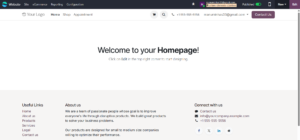
The initial Odoo website provides a useful starting point. From the website interface, users can move into editing mode and begin designing the page directly.
2. Open the Odoo 19 Website Builder
To customize a page, open the required website page and click Edit. Odoo then opens the visual Website Builder, where page elements can be added and modified without leaving the website.
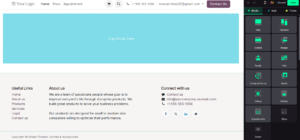
The editor provides three important areas: Blocks for adding content, Style for adjusting the selected element, and Theme for controlling the overall website design. Understanding this distinction helps prevent local changes from being confused with global settings.
3. Build Pages with Drag-and-Drop Blocks
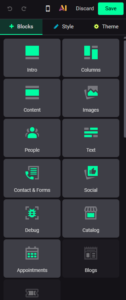
The Blocks panel contains reusable website components that can be dragged onto the page. The example database includes categories such as Intro, Columns, Content, Images, People, Text, Contact & Forms, Social, Appointments, and Blogs.
This approach makes page creation faster because users can start with a predefined structure and then customize its content and appearance. For example, an Intro block can be used for a landing-page opening section, while Text or Images blocks can provide supporting information.
4. Customize the Selected Website Element
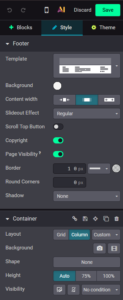
After selecting a website element, the Style panel provides controls for that specific element or section. The available options vary depending on what has been selected.
The screenshot shows controls for content width, background, height, visibility, borders, rounded corners, and shadow. These options can refine an individual section without changing the entire website.
Use Style when the change is intended for the selected block or section, and Theme when the design should be applied consistently across the website.
5. Manage Global Website Design with the Theme
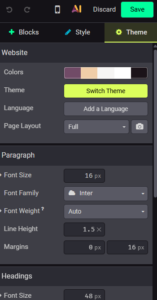
The Theme panel is used for website-wide visual settings. It provides access to colors, theme selection, languages, page layout, and typography.
Global theme settings are useful for maintaining consistency. Common design choices such as fonts and color palettes can be managed centrally instead of being changed page by page.
6. Customize Typography and Fonts
Typography has a major effect on readability and visual identity. Odoo 19 provides separate controls for paragraphs and headings, including font size, font family, font weight, line height, and margins.
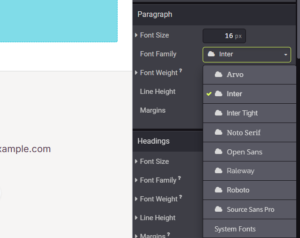
For example, the database shown uses Inter as the paragraph font. Different font families can be selected from the available list, while headings can be configured separately. Consistent typography helps visitors scan content more easily and gives the website a professional appearance.
7. Add a Google Font or Custom Font
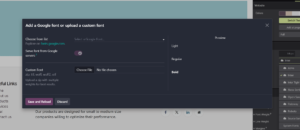
Odoo 19 provides an option to add a Google font or upload a custom font. The font dialog allows users to choose a Google Font from the available list and preview its appearance.
For businesses with a specific brand typeface, the same interface supports custom font files such as ZIP, TTF, WOFF, WOFF2, and OTF formats. This gives organizations more flexibility when standard fonts do not match their brand guidelines.
8. Create a Consistent Color Palette
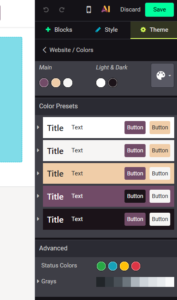
Color is an important part of website branding. Odoo 19 allows the website’s main colors to be configured from Theme settings, including main and light/dark combinations.
The Color Presets section provides ready-made combinations for titles, text, and buttons. Using a consistent palette across pages can make navigation more intuitive and strengthen the visual identity of the website. Status colors and grayscale options also help maintain consistency for interface elements.
9. Explore Different Page Layouts
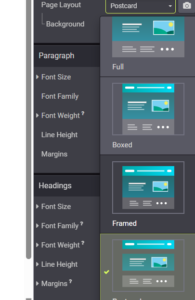
Odoo 19 provides different page layout styles that change how content is presented. The Page Layout option can be used to select an appropriate presentation style for a page.
For example, layouts such as Full, Boxed, Framed, and Postcard offer different visual treatments. The right choice depends on the type of content and the experience you want visitors to have.
10. Best Practices for an Effective Odoo Website
A professional website is not created by adding as many design elements as possible. The goal is to make the website clear, useful, and easy to navigate. The following practices can help when designing pages in Odoo 19:
- Keep page layouts simple and avoid unnecessary visual elements.
- Use clear headings so visitors can quickly understand each section.
- Keep the logo and navigation in predictable locations.
- Use prominent but relevant call-to-action buttons.
- Choose readable fonts and maintain consistent typography.
- Use a limited and consistent color palette that matches the brand.
- Use images to support the content rather than distract from it.
- Use Theme settings for global branding and Style settings for block-specific adjustments.
- Preview the website on different screen sizes before publishing.
Conclusion
Odoo 19 Website Builder provides a practical way to create and maintain professional web pages through a visual editing environment. With reusable building blocks, block-level Style controls, and global Theme settings, businesses can build pages without relying on complex coding for everyday design changes.
Typography, fonts, colors, layouts, and content structure all contribute to the visitor experience. By combining these tools with simple and consistent web design principles, businesses can create websites that are both visually appealing and easy to use.




5 Comments