
A practical walkthrough using Salary Adjustments, Payslips and Pay Structures
Payroll doesn’t stop at calculating basic pay and allowances. Many organisations also need to withhold part of an employee’s salary for court-ordered deductions, child support, salary attachments, or other agreed recoveries, and get the numbers right on every payslip without redoing the math each month.
Odoo 19 Payroll handles this through Salary Adjustments, a dedicated way to configure these deductions once and have them flow automatically into payslip calculations. This guide walks through a complete, real example: setting up an employee’s payroll information, creating salary adjustments for a salary attachment and a child support deduction, and generating a payslip that reflects the correct net salary.
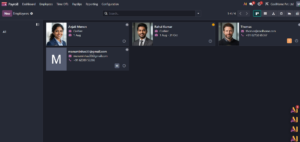
1. Why salary attachments and deductions matter
Payroll is not always just a matter of calculating basic salary and allowances. In real payroll processing, there can be amounts that need to be withheld from an employee’s pay and carried into the payslip as deductions. These can include child support, court-ordered deductions, salary attachments, recoveries, or other agreed adjustments.
Odoo 19 Payroll gives these adjustments a place in the employee’s payroll flow instead of forcing the payroll team to calculate them separately every month. The key is to configure the adjustment, attach it to the employee, and then let the payslip calculation include it.
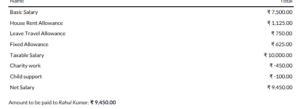
In the example below, Rahul Kumar’s regular salary is calculated first. A ₹450 salary attachment and a ₹100 child support deduction are then applied, giving a net salary of ₹9,450.
2. Start from the employee’s payroll information
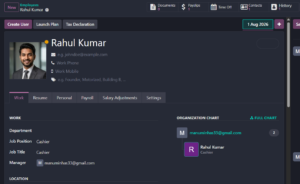
Open the employee record and go to the Payroll section. This is where the employee’s contract, wage, salary components and other payroll-related information are maintained.
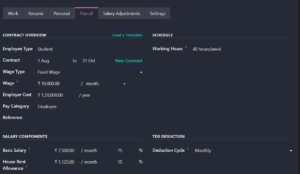
For this example, the employee has a fixed monthly wage of ₹10,000. The salary structure is based on the India Regular Pay structure, with the basic salary and allowances contributing to taxable salary.
3. Create a Salary Adjustment
The Salary Adjustments menu is used to record deductions that should be applied to an employee’s payslip. Instead of entering the same deduction manually on every payslip, the payroll team can create an adjustment with its own type, amount, start date, duration and note.
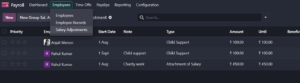
In the example, two adjustments are configured for Rahul Kumar. One is a child support deduction of ₹100 per payslip, and the other is a ₹450 salary attachment described as ‘Charity work’.
4. Configure the salary adjustment
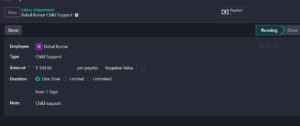
The Child Support adjustment is set to ₹100 per payslip. The duration is One Time and the adjustment starts from 1 September. The note helps payroll users understand why the amount is being deducted.
| Useful detail: The duration option matters. A one-time adjustment is useful for a single deduction, while a limited or unlimited adjustment can be used when the deduction needs to continue across future payslips. |
5. You can see that the salary adjustment is in the Running stage.

The salary attachment is recorded separately with an amount of ₹450 per payslip. Keeping it as a separate adjustment makes the deduction visible in the payroll records and on the employee’s payslip.

6. Make sure the pay structure can calculate the salary correctly
Salary adjustments work alongside the normal payroll calculation. Before generating the payslip, the employee must have a suitable contract and pay structure. In Odoo, the pay structure contains the salary rules that determine how earnings, taxable salary and deductions are calculated.
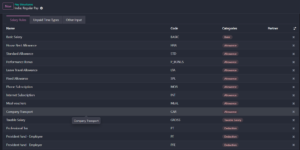
The structure in this example includes rules such as Basic Salary, House Rent Allowance, Leave Travel Allowance, Fixed Allowance and Taxable Salary. Deduction rules are also available in the structure for payroll calculations.
7. Generate the employee’s payslip
Once the employee’s contract and adjustments are ready, create the payslip for the relevant pay period. For the example, the payslip covers 1 September to 30 September.
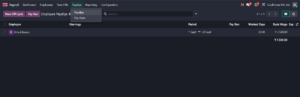
8. Check worked days and salary inputs
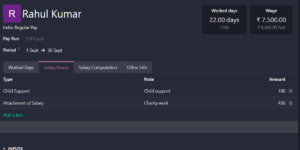
The Worked Days tab confirms the attendance information used in the calculation. In this example, the payslip shows 22 worked days and 176 hours, with ₹10,000 recorded as the attendance amount.
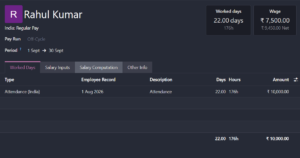
The Salary Inputs tab is where the configured adjustments appear as payroll inputs. This is an important checkpoint: it shows that the child support and salary attachment are being picked up by the payslip.
9. Review the salary computation
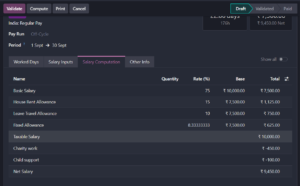
After the inputs are loaded, compute the payslip and open Salary Computation. Odoo combines the normal salary rules with the deduction inputs to arrive at the final amount.
10. Validate and pay the payslip
After checking the figures, validate the payslip. Once it is processed for payment, the status moves through the payroll workflow and the record can be kept as the official payroll document.
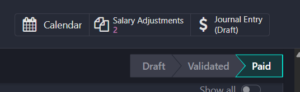
The important point is that the deductions are not lost after validation. They remain part of the salary computation and are reflected in the final payslip.

11. What the employee finally receives
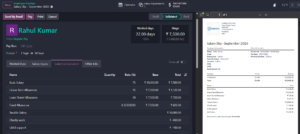
The final payslip provides a clear breakdown of both earnings and deductions. In this example, Rahul Kumar’s salary starts at ₹10,000 and the two deductions reduce the amount payable to ₹9,450.
12. Practical points for payroll teams
- Use a separate Salary Adjustment for each deduction that needs to be tracked independently.
- Add a clear note or description so another payroll user can understand the reason for the deduction.
- Choose the duration carefully: One Time, Limited or Unlimited should match the real payroll requirement.
- Check the Salary Inputs tab before validating the payslip. It is a quick way to confirm that the adjustment reached the payslip.
- Always review Salary Computation before payment, especially when several deductions or salary rules are involved.
- Keep the employee’s contract and pay structure up to date because the salary adjustment is applied within the wider payroll calculation.
13. Conclusion
Salary attachments and deductions are much easier to manage when they are part of the normal payroll process. In Odoo 19, the payroll team can create an adjustment for an employee, define how long it should apply, and then let the payslip calculation include it automatically.
The example used here shows the complete flow: configure the employee, create the salary adjustments, generate the payslip, verify the salary inputs, review the computation, and validate the final payroll. With the right salary structure and clear adjustment records, payroll users can keep deductions consistent and easy to audit.
| Example result: ₹10,000 salary − ₹450 salary attachment − ₹100 child support = ₹9,450 net salary. |