


Warehouse operations are not the same for every business. A small business may move products directly from a supplier into stock, while a larger organization may need separate receiving, quality control, picking, packing, and delivery stages. Odoo 19 provides warehouse configuration options that allow companies to choose the level of control that fits their operations.
One of the key settings is Multi-Step Routes. When enabled, incoming and outgoing products can pass through multiple warehouse operations instead of being handled in a single step. This blog explains how to enable the feature, configure a warehouse, understand the available incoming and outgoing shipment flows, and test the resulting inventory operations.
- Enable Multi-Step Routes
Multi-Step Routes allow products to move through multiple warehouse locations or operations. Instead of treating a receipt or delivery as one movement, Odoo can create a sequence of steps that reflects the company’s actual warehouse process.
To enable the feature, go to Inventory → Configuration → Settings. In the Warehouse section, enable Multi-Step Routes and save the configuration. Storage Locations can also be enabled when the warehouse needs to track products at specific internal locations.

- Configure the Warehouse
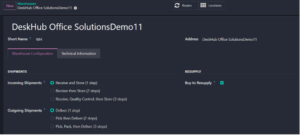
After Multi-Step Routes is enabled, open Inventory → Configuration → Warehouses and select the warehouse you want to configure. The Warehouse Configuration area provides separate settings for Incoming Shipments and Outgoing Shipments.
For incoming products, Odoo provides three processing choices: Receive and Store in one step; Receive then Store in two steps; or Receive, Quality Control, then Store in three steps. For outgoing products, the choices are Deliver in one step; Pick then Deliver in two steps; or Pick, Pack, then Deliver in three steps.
- Incoming Shipments: Receiving Products from Vendors
Incoming Shipment configuration determines how products move into the warehouse after a supplier delivers them. The correct choice depends on how much inspection and internal handling the business requires.
3.1 Receive and Store — 1 Step
In the one-step incoming workflow, products received from the vendor move directly into warehouse stock. This is the simplest receiving method and is useful when products do not require a separate inspection or storage staging process.
Workflow: Vendor → Stock
Example: A supplier delivers 20 Office Chairs. After the receipt is validated, the 20 chairs become available in warehouse stock.
Benefits include a simple process, fewer warehouse operations, and faster inventory updates.
3.2 Receive Then Store — 2 Steps
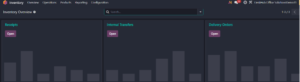
The two-step incoming workflow separates receiving from final storage. Products are first received in an input or receiving area and are then moved into the warehouse storage location.
Workflow: Vendor → Receipts → Storage
Example: A supplier delivers 15 Printers. The printers are received in the input area and can be checked before being transferred to storage.
This workflow provides more control than one-step receiving and can be useful when the receiving team needs to verify deliveries before products enter regular stock.
3.3 Receive, Quality Control, Then Store — 3 Steps
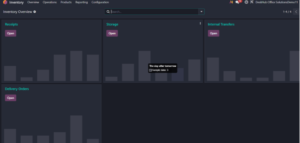
The three-step incoming workflow adds a dedicated Quality Control stage between receiving and storage. This is useful when products must be inspected before they are made available in stock.
Workflow: Vendor → Receipts → Quality Control → Storage
Example: A shipment of 50 Laptop Bags arrives. The products are first received, then inspected by the Quality team, and finally transferred to storage after approval.
This configuration provides stronger control over incoming products and is particularly useful when quality checks are an important part of the receiving process.
- Outgoing Shipments: Delivering Products to Customers
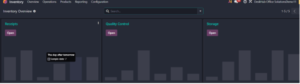
Outgoing Shipment configuration controls how products move from warehouse stock toward the customer. Just like incoming shipments, Odoo allows businesses to choose between one, two, or three operational steps.
4.1 Deliver Directly — 1 Step
In the one-step outgoing workflow, products move directly from warehouse stock to the customer through a delivery order. This is appropriate when the warehouse does not require separate picking or packing stages.
Workflow: Stock → Customer
Example: A customer purchases 10 Office Tables. The warehouse processes the delivery and ships the products directly.
4.2 Pick Then Deliver — 2 Steps
The two-step outgoing workflow separates product picking from the final delivery. Warehouse staff first pick the required products from storage and then prepare them for delivery.
Workflow: Stock → Picking → Delivery
Example: A customer orders 30 Office Chairs. The warehouse team first picks the chairs from stock and then processes the delivery order.
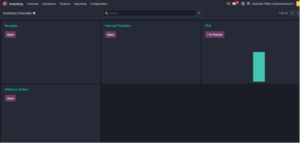
4.3 Pick, Pack, Then Deliver — 3 Steps
The three-step outgoing workflow separates picking and packing before the final delivery. This allows different warehouse activities to be handled as distinct operations.
Workflow: Stock → Picking → Packing → Delivery
Example: A customer purchases 25 Desktop Computers. The warehouse first picks the computers, then packs them, and finally processes the delivery to the customer.
This setup is useful when packing requires a separate team or procedure and when the business needs greater control over order preparation.
- Test the Warehouse Configuration
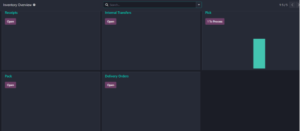
After configuring the warehouse, it is useful to test the setup with real inventory transactions. A Purchase Order can be used to test incoming operations, while a Sales Order can be used to test outgoing operations.
Purchase Order Test
- Create a Request for Quotation for a product.
- Confirm the RFQ as a Purchase Order.
- Open the generated receipt.
- Process and validate the receipt according to the configured incoming workflow.
- Observe how many inventory operations are created.
Sales Order Test
- Create a Sales Order for a product.
- Confirm the order.
- Open the generated warehouse operations.
- Process the picking, packing, and delivery steps according to the configured outgoing workflow.
- Observe how the number of operations changes with the selected configuration.
- Comparing the Warehouse Workflows
| Configuration | Workflow | Operations |
| Incoming — 1 Step | Vendor → Receipts / Stock | 1 receipt |
| Incoming — 2 Steps | Vendor → Receipts → Storage | 2 operations |
| Incoming — 3 Steps | Vendor → Receipts → Quality Control → Storage | 3 operations |
| Outgoing — 1 Step | Stock → Delivery | 1 delivery |
| Outgoing — 2 Steps | Stock → Picking → Delivery | 2 operations |
| Outgoing — 3 Steps | Stock → Picking → Packing → Delivery | 3 operations |
The number of operations increases as additional control points are introduced. A one-step workflow prioritizes simplicity, while two- and three-step workflows provide additional stages for receiving, inspection, picking, packing, or storage.
- Choosing the Right Configuration
The best warehouse configuration depends on the company’s operational requirements. A one-step process may be sufficient when products can be received or shipped without additional handling. A two-step process can introduce a separate receiving or picking stage, while a three-step process can add quality control or packing as a dedicated operation.
The objective is not to use the maximum number of steps, but to configure Odoo so that the digital workflow matches the physical warehouse process. Additional steps provide more control, but they also create more operations for warehouse users to process.
Conclusion
Odoo 19 provides flexible warehouse configuration through Multi-Step Routes. Businesses can configure incoming shipments as one, two, or three steps and configure outgoing shipments using the same approach. This allows the warehouse workflow to reflect the actual way products are received, inspected, stored, picked, packed, and delivered.
By testing the configuration with Purchase Orders and Sales Orders, users can clearly see how the selected warehouse settings affect the inventory operations generated by Odoo. With the right configuration, Odoo can provide a practical balance between operational simplicity and warehouse control.



1 Comment