

The official Odoo 20 release notes bring major changes across many applications. For business owners and expert Odoo ERP implementation teams, the key question is not how many features have changed, but which updates could improve the way their teams work.
Odoo’s official release notes list Odoo 20 as released in September 2026. This guide groups selected updates by business purpose and explains their practical implications across accounting, website and eCommerce, calendar, inventory, manufacturing, employees, documents, and field service.
The information below is based primarily on official Odoo release notes. Availability may depend on installed apps, edition, localization, configuration, and connected services. Treat this as a practical overview, not a replacement for reviewing the complete release notes or testing your own workflows.
Odoo 20 at a glance
- Accounting: account-structure changes, reconciliation improvements, and payment-related options.
- Website and eCommerce: structured data by default, expanded form options, and website-editor improvements.
- Calendar and communication: activity handling, calendar synchronization, and chatter filters.
- Inventory and manufacturing: refinements to packages, scanning, lot/serial handling, and shop-floor operations.
- Employees and Documents: changes to employee workflows, document access, and file organization.
- Field Service: service operations are integrated into Planning rather than offered as a separate standalone app.
The business impact depends on which Odoo apps your organization relies on most. An online retailer may prioritize website changes, while a manufacturer may focus on inventory traceability and production workflows.
Accounting and finance: smoother daily operations
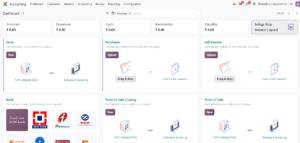
Odoo 20 includes accounting updates that affect account configuration, reconciliation, and payment processing.
Parent accounts and chart structure
Account groups have been replaced by parent accounts as the way to structure charts of accounts, and account codes are now optional. Before changing an existing chart, accounting teams should review how the hierarchy supports their reports and localization requirements.
Reconciliation and payment workflow
The release notes describe faster data entry through reconciliation-model shortcuts and statement transaction batching. They also describe analytic distribution for write-offs, improved onboarding for e-invoicing and tax configuration, and moving the PAIN version setting for outgoing payments from journals to payment methods.
Odoo also documents an interface for initiating bill payments individually or in batches through supported payment initiation service providers. Availability depends on provider support, country, and configuration.
Business takeaway: review your chart of accounts, reconciliation routines, payment methods, and localization settings in a test database before upgrading.
Website and eCommerce: practical improvements for online visibility
The Odoo 20 website updates offer more tools for content management and visitor-facing forms.
Structured data by default
The official release notes state that structured data is added to webpage HTML by default to support SEO and Google Rich Results. Structured data helps search engines interpret page content, but does not guarantee higher rankings or a rich result. Content quality, relevance, indexing, and search-engine eligibility still matter.
More flexible forms and content
- Form settings include file-type restrictions, character limits, and email-domain restrictions.
- Website editor and theme options have been expanded.
- Editors can preview blocks on mobile devices.
- Static page URLs can be translated per language on multilingual websites.
- A WhatsApp snippet lets visitors start a conversation with a business.
- Additional options are available for product and event snippets, dynamic carousels, and vertical video.
Business takeaway: prioritize improvements that support your conversion path. After upgrading, test forms, mobile rendering, tracking, translated pages, and SEO metadata.
Calendar, activities, and team communication
Several updates focus on reducing small interruptions in everyday coordination.
Activity assignment and tracking
New activities can be assigned to an individual or a role, and activity scheduling and tracking have received usability improvements. This can help when follow-up responsibility belongs to a team function rather than one person.
Calendar improvements
- When scheduling is enabled in calendar view, records can be unscheduled by dragging them to the side panel.
- Google Calendar and Microsoft Outlook synchronization has been improved.
- Work locations configured in Google Calendar can be reflected in Odoo Calendar.
- Calendar events can be linked to Odoo records, and pending activities can be managed from Calendar.
- When an event title contains a time, Odoo can detect that time when creating the event.
Chatter and email
Chatter can be filtered to focus on conversations or tracked changes. Emails sent from Odoo can include CC recipients, and the chatter records who was copied. These updates can make communication history easier to review.
Business takeaway: test assignment rules, synchronization, notifications, and communication history with representative user roles. Calendar sync still depends on account connections and configuration.
Inventory and manufacturing: better operational control
The official release notes include refinements to warehouse operations, barcode workflows, package handling, and manufacturing execution.
Package handling and barcode operations
Vendor-provided package contents can be pre-encoded in Inventory. When the package arrives, staff can scan it to register the package and its contents as received. The notes also describe improvements for untracked goods inside packages during later barcode scans.
Lot and serial number handling
Manufacturing changes refine scanning and lot/serial behavior. Reserved lot or serial numbers for components are shown only when the relevant setting is active, and mandatory scanning should no longer block editing by-products in the described scenario. Manual entry of a lot number and quantity is supported when scanning is not possible.
Business takeaway: test a complete receipt-to-delivery flow, including package contents, lot/serial tracking, and manufacturing orders. Validate it with the barcode devices and hardware used at your site.
Employees and Documents: more connected workflows
Odoo 20 includes changes to employee self-service, HR documents, and file access.
- In a multi-company database, users can see employees across companies in the database.
- Salary simulation can be started from an employee profile with relevant information pre-filled.
- The Remote Work module has been merged into the Employees app.
- HR users can prepare single-signer documents with employee details filled from configuration and send them for signature.
Employee visibility across companies does not mean every user should access sensitive HR fields. Review permissions and record rules carefully.
Document updates include group-based access rights for folders and files, automatic sorting for fleet documents, notifications when requested files are uploaded, and improved employee document organization. Payslips are directed to a dedicated folder with a shortcut available from the employee’s My Drive.
Business takeaway: audit document permissions after upgrading. Confirm that employees, managers, HR staff, and administrators see only the information appropriate to their roles.
Field Service now works through Planning
In Odoo 20, Field Service is no longer presented as a separate standalone app; its functions are integrated into Planning. This matters to teams that schedule technicians, manage on-site interventions, track customer equipment, or coordinate materials and travel.
Odoo’s release notes and Odoo Experience materials describe field-service workflows inside Planning, including customer-location-aware scheduling, technician location maps, equipment history, linked technical documents, materials, and customer communication. The exact features available should be checked in the installed configuration.
Existing implementations should review custom modules, menus, user training, reports, integrations, and automated actions that refer to the former Field Service app. Test scheduling and service completion in a duplicate database before upgrading production.
Sales, CRM, and customer-facing workflows
Odoo 20 updates several customer-facing workflows, but the exact features vary by module and configuration. The release notes describe improvements to activities and communication history, while website forms and WhatsApp entry points can help prospects contact a business.
Before relying on a specific sales or AI feature, confirm that it is explicitly documented for your edition and configuration. Do not assume every AI-assisted feature is autonomous or enabled by default.
Business takeaway: test the customer journey from website enquiry to CRM follow-up, quotation, and after-sales service. Check ownership, notifications, communication history, and reporting.
Blog and content publishing updates
For businesses publishing through Odoo, the Blog module includes more design options for posts, landing pages, and category pages. A recommended post can appear at the end of an article, and followers can receive email notifications when a scheduled post is published.
These features can improve content navigation and publishing workflows, but they do not replace editorial review, search-intent research, accessible design, or mobile testing.
Should your business upgrade to Odoo 20?
A major-version upgrade should be based on business value and implementation readiness, not simply the number of new features.
- Do the new features solve a current operational problem?
- Are your required apps, localizations, payment providers, and integrations compatible?
- Do custom modules depend on changed apps, models, menus, or workflows?
- Can you test the upgrade on a duplicate database and validate critical processes?
- Have you planned user training, a migration window, backups, and recovery procedures?
If Odoo 20 offers clear benefits, build an upgrade plan and test the workflows that matter. If your current system is stable and the new features are not urgent, evaluate the changes first and schedule the upgrade after testing.
Odoo lists standard support for Odoo 20 through September 2029 as planned. Confirm current support terms and eligibility using the official support documentation.
Upgrade-readiness checklist
- List the apps and business processes your organization uses.
- Review the official Odoo 20 release notes for each relevant app.
- Inventory custom modules, third-party modules, and external integrations.
- Duplicate the database and test the upgrade in a staging environment.
- Test critical workflows such as sales, purchasing, inventory, accounting, payroll, website, and field service as applicable.
- Check access rights, multi-company behavior, reports, email templates, scheduled actions, and automated processes.
- Train affected users and document interface changes.
- Schedule production work, confirm backups, and define a recovery plan.
Adapt the checklist to your system. A retailer, manufacturer, and service company will have different high-risk workflows.
Conclusion
Odoo 20 updates many parts of the business system, including accounting, website tools, calendar coordination, inventory, manufacturing, employees, documents, and field service. The most valuable changes are those that improve a workflow your organization actually uses.
Use the official release notes to identify relevant features, then validate them in a test database with your own data, roles, localizations, and integrations. A planned, tested upgrade is more reliable than switching versions based only on a feature list.
Frequently asked questions
When was Odoo 20 released?
Odoo’s official release-notes page lists Odoo 20 as released in September 2026.
Does Odoo 20 include website SEO improvements?
Yes. The release notes describe structured data in webpage HTML by default and improvements to website forms and the editor. Structured data does not guarantee ranking improvements.
Is Field Service a separate app in Odoo 20?
No. Odoo 20 integrates Field Service functions into Planning. Review customizations and workflows that depended on the former app structure.
Should every Odoo 19 user upgrade immediately?
Not necessarily. The decision depends on business needs, compatibility, customizations, and your ability to test the upgrade safely.
Are all Odoo 20 features available in every edition and country?
No. Availability can depend on edition, localization, configuration, connected services, and installed apps.
References and further reading
Odoo official release notes: https://www.odoo.com/page/release-notes
Odoo 20 release notes: https://www.odoo.com/ca_ES/odoo-20-release-notes
Odoo 20 support policy: https://www.odoo.com/documentation/20.0/administration/standard_extended_support.html
Odoo Experience 2026 — The new Field Service flow in Planning: https://www.odoo.com/event/odoo-experience-2026-9099/track/the-new-field-service-flow-in-planning-1059
2 Comments