
Managing purchases in a business involves several connected activities. A company may need to identify a requirement, request pricing from a vendor, confirm the purchase, and finally make sure the ordered products are received. When these activities are handled manually, it can become difficult to track the status of an order and maintain a clear record of vendor communication.
Odoo 19 connects these stages through the Purchase application. A Request for Quotation can be created, sent to a vendor, converted into a Purchase Order, and linked to the corresponding receipt. This gives purchasing and warehouse teams a common workflow and improves visibility throughout the process.
- Start from the Requests for Quotation screen
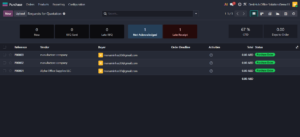
The process begins in the Purchase application. Open Purchase and go to Requests for Quotation. This screen provides an overview of existing purchasing documents and shows information such as the reference, vendor, buyer, order deadline, total, and status. The New button can be used to start a new RFQ.
- Create a Request for Quotation
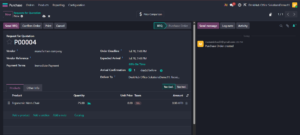
Click New to create the RFQ. Select the vendor and add the products that need to be purchased. In this example, the vendor is manufactore company and the product is Ergonomic Mesh Chair, with a requested quantity of 25 units. Odoo also provides fields for the order deadline, expected arrival, payment terms, delivery location, and other purchasing information.
- Review the RFQ details
Before sending the request, review the vendor, product, quantity, taxes, delivery location, and expected arrival information. Checking these details at this stage helps ensure that the vendor receives the correct requirement and that the later Purchase Order reflects the intended purchase.
- Send the RFQ to the vendor
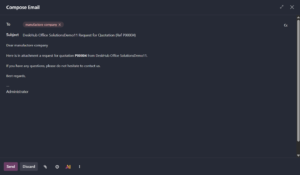
After reviewing the RFQ, click Send RFQ. Odoo opens an email composition window with the vendor as the recipient. The message identifies the RFQ reference and indicates that the request for quotation is attached. Because the email is sent from the purchasing document, the communication remains part of the purchase record.
- Track the sent RFQ
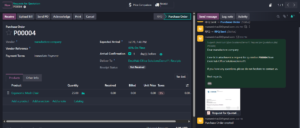
Once the RFQ is sent, Odoo records the communication in the document chatter and updates the document status. The purchasing team can use the same record to follow the progress of the request. This keeps the vendor communication and purchasing information together instead of requiring separate email records or spreadsheets.
- Confirm the Purchase Order
When the purchase is ready to proceed, the RFQ can be confirmed as a Purchase Order. The confirmed order represents the company’s purchase commitment to the vendor. In the example, the Purchase Order contains 25 Ergonomic Mesh Chairs. Odoo also shows that the related receipt has not yet been received, providing visibility into the next stage of the process.
- Receive the products
When the vendor delivers the products, the receiving team can open the receipt linked to the Purchase Order. The receipt provides the quantities expected and allows the team to record the quantities actually delivered. This maintains a direct connection between the original order and the physical receipt of goods.
- Validate the receipt
The receiving team should check the delivered products and quantities against the Purchase Order. After confirming that the receipt is correct, the receipt can be validated. This completes the receiving step and updates the purchasing document so that the order’s receipt status reflects the goods that have been received.
The complete purchase workflow
The workflow demonstrated in this example is: Requests for Quotation → create RFQ → select vendor and products → send RFQ → confirm Purchase Order → receive products → validate receipt. Each stage is connected in Odoo, allowing users to follow the purchase from the initial requirement through delivery.
Benefits of managing purchases in Odoo 19
A connected purchasing workflow makes it easier to monitor vendor requests, confirmed orders, and incoming products. Purchasing users can see which RFQs have been sent and which orders are confirmed, while warehouse users can process the linked receipts. This reduces duplicate data entry and gives teams a clearer view of the purchasing cycle.
Odoo also improves traceability by keeping related documents and communication together. A Purchase Order can be linked to its receipt, while the chatter provides a record of relevant communication. This makes it easier to understand what was requested, what was ordered, and what was ultimately received.
Conclusion
Odoo 19 provides a structured way to manage purchasing from a Request for Quotation through Purchase Order confirmation and product receipt. By keeping each stage connected, businesses can improve visibility, reduce manual follow-up, and maintain a clearer record of purchasing and receiving activities.