
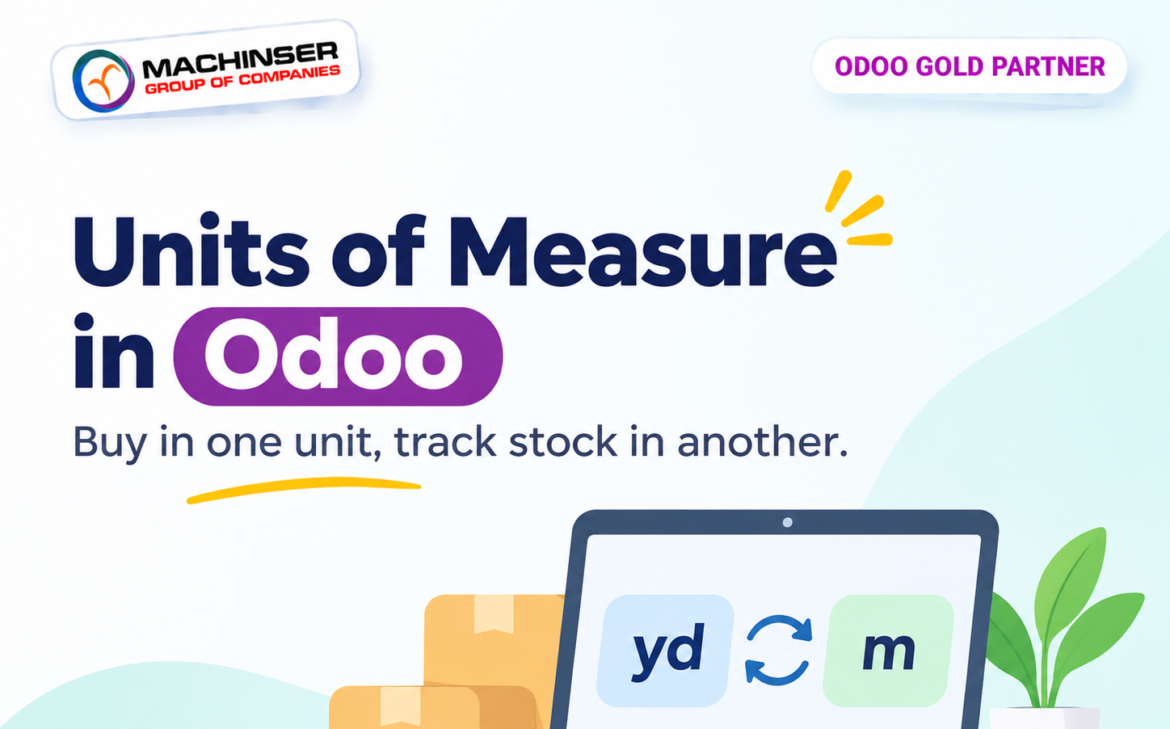
A textile business may purchase cotton fabric from a supplier in yards, while its warehouse team records stock in metres. Managing measurements efficiently is crucial for businesses like textile suppliers. If employees have to convert every purchase quantity manually, the process becomes slower and mistakes are more likely.
Odoo Inventory can manage this difference using Units of Measure (UoM). You can set one unit as the product’s inventory unit and use another compatible unit for purchasing. When the purchase is received, Odoo converts the quantity into the unit used for stock tracking.
In this walkthrough, we’ll use the example shown in the screenshots: US Supima Long-Staple Cotton is purchased in yards and tracked in metres. We’ll follow the setup from product configuration through the purchase order, receipt, and forecasted inventory.
Example: Purchase in Yards, Track Stock in Metres
The product is configured with Metre (m) as its inventory unit. Its vendor, Carolina Fine Cotton Mills Inc., supplies it in Yards. The conversion is configured so that one yard is approximately 0.914 metre.
A purchase of 100 yards is therefore received into inventory as approximately 91.44 metres.
| Stage | Unit | Quantity |
| Purchase order | Yard | 100.00 yd |
| Warehouse receipt | Metre | 91.44 m |
| Forecasted stock | Metre | 91.44 m |
Step 1: Enable Units of Measure
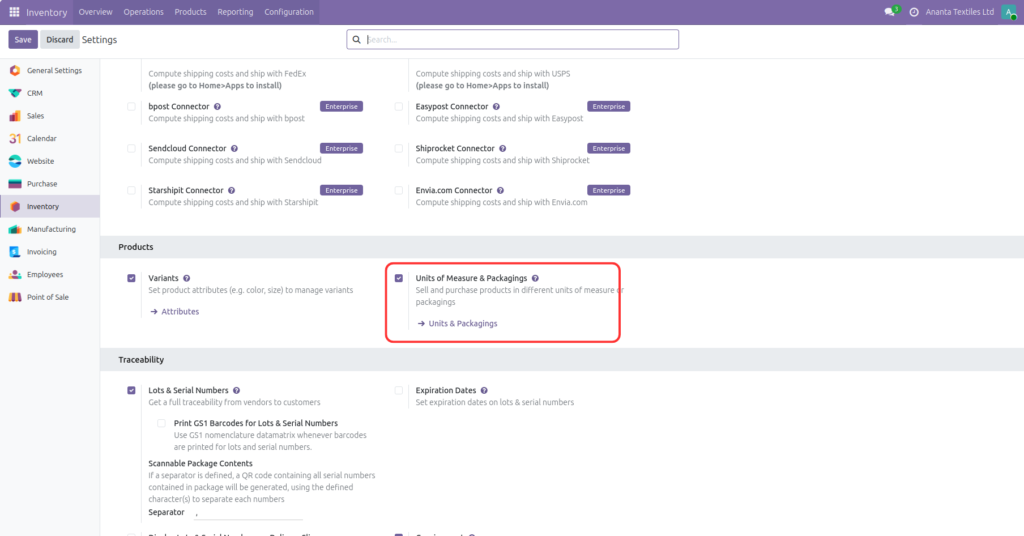
Open Inventory → Configuration → Settings. In the Products section, enable Units of Measure & Packagings, then save the settings.
Step 2: Check the Available Units
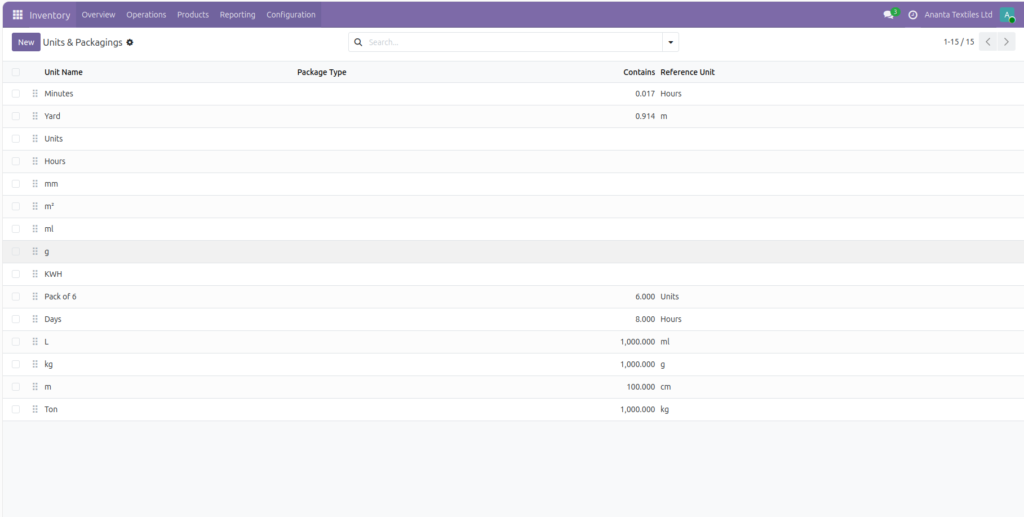
Go to Inventory → Configuration → Units & Packagings. This page lists the units available in the database, together with their conversion quantity and reference unit.
In this example, Yard is configured in relation to Metre. The list shows approximately 0.914 m for one Yard. Check the conversion value and reference unit carefully before using the unit in transactions.
Step 3: Configure the Product’s Inventory Unit
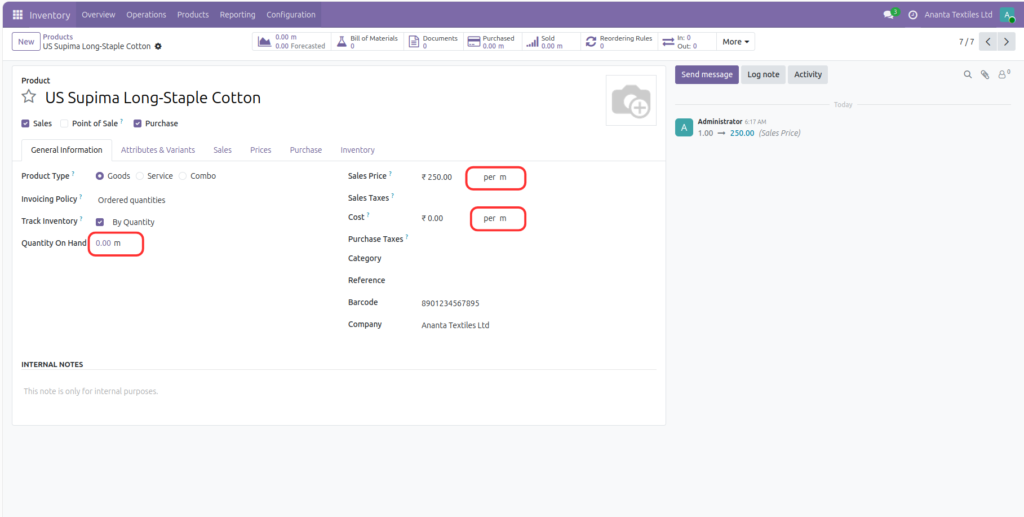
Open Inventory → Products → Products and select US Supima Long-Staple Cotton. In the General Information tab, set the product’s Unit of Measure to Metre (m). This is the unit Odoo uses to track the product’s inventory.
The product form also displays the sales price and cost per metre. Using a consistent inventory unit makes it easier for warehouse staff to understand on-hand quantities.
Step 4: Set the Vendor’s Purchase Unit
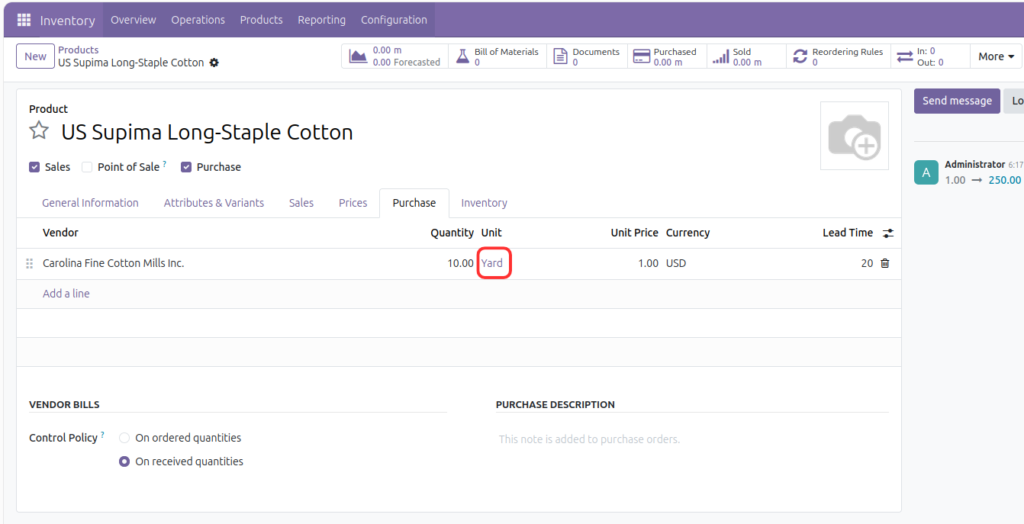
Open the product’s Purchase tab and locate the vendor line. Set the vendor’s Unit to Yard. This tells Odoo that this supplier provides the product using yards as the purchase unit.
You can also configure the vendor’s minimum quantity, price, and lead time on this line. In the example, the vendor line uses Yard.
Step 5: Create a Purchase Order in Yards
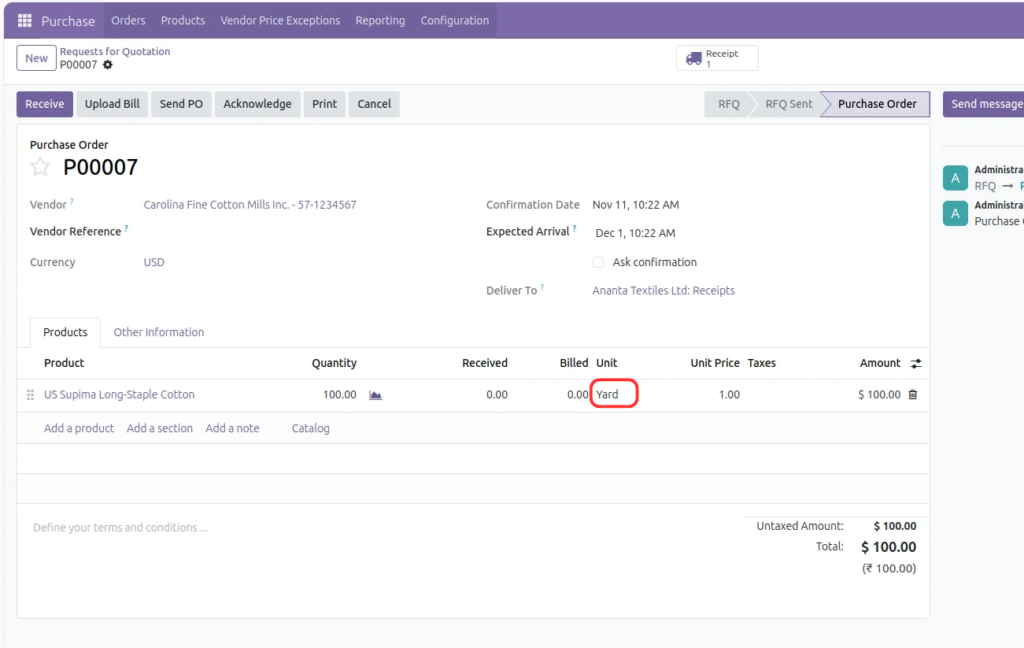
Create a request for quotation in the Purchase app and select the vendor. Add the configured cotton product to the order line. Odoo uses the vendor’s purchase unit, so the quantity is entered in yards.
The example purchase order shows 100.00 Yard. The order is expressed in the supplier’s unit, even though the product’s inventory unit remains metre.
Step 6: Receive the Product in Metres
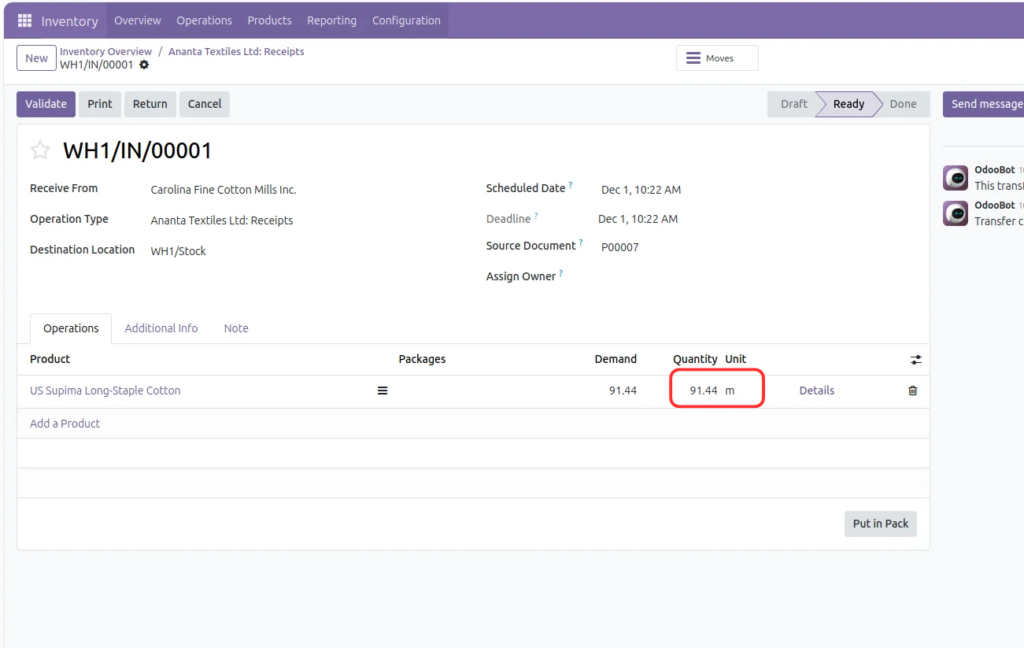
After confirming the purchase order, open its receipt. The receipt line displays the product quantity in the inventory unit. Here, 100 yards is converted to 91.44 m.
Review the received quantity and validate the receipt once the goods have arrived and the quantities have been checked. The stock is then updated using metres.
Step 7: Check Forecasted Inventory
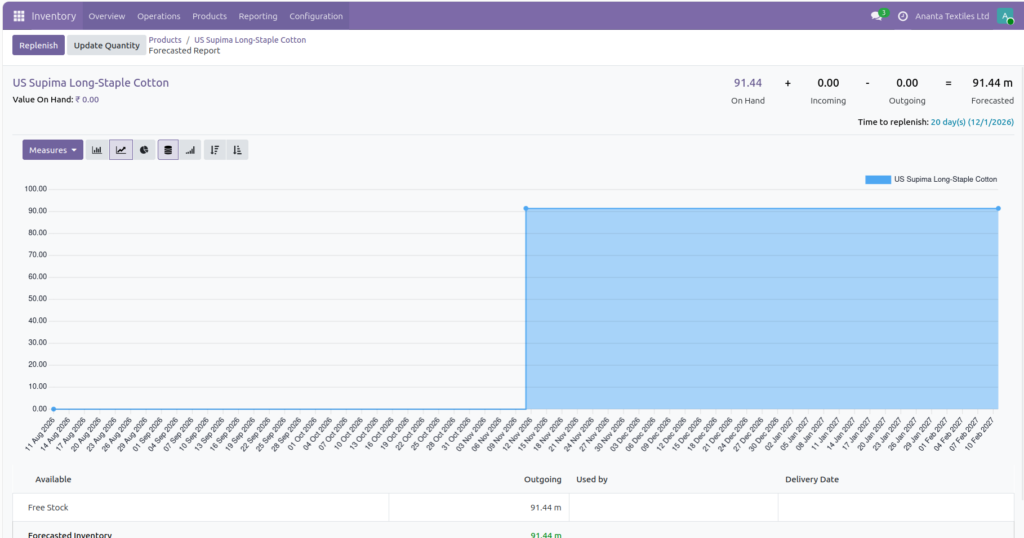
Open the product’s forecasted report after validating the receipt. The report helps you review on-hand, incoming, outgoing, and forecasted quantities.
The screenshot shows 91.44 m on hand and 91.44 m forecasted, with no incoming or outgoing quantity remaining in the displayed summary. The received quantity is reflected in the product’s stock unit.
What Happens Behind the Scenes?
The product has a default inventory unit, while the vendor line has a purchase unit. Because Yard and Metre belong to the same length category, Odoo can convert between them using the configured conversion factor.
- Purchase document: the quantity is expressed in the vendor’s purchase unit (Yard).
- Receipt and stock: the quantity is expressed in the product’s inventory unit (Metre).
- Forecast: inventory quantities are displayed using the product’s inventory unit.
The conversion does not change the physical quantity received. It changes how that quantity is represented in Odoo.
Important Things to Check
- Both units must belong to the same UoM category. Odoo cannot perform a standard conversion between unrelated categories such as length and weight.
- Check the conversion factor and reference unit carefully. An incorrect factor can produce incorrect stock quantities.
- Configure the purchase unit on the correct vendor line, especially when suppliers sell the same product in different units.
- Choose an inventory unit that makes sense for warehouse counting and stock management.
- Test the setup with a sample purchase and receipt before using it for live transactions.
Units of Measure and Packaging Are Not the Same
A Unit of Measure represents how a quantity is measured, such as metres, yards, kilograms, or litres. Packaging represents a product-specific pack containing a defined number of units, such as a box of 12 pieces. Use UoM conversion when the measurement changes, and packaging when you need to manage a particular pack size.
Can I purchase a product in yards and store it in metres?
Yes. Set Metre as the product’s inventory unit and Yard as the vendor’s purchase unit, provided both units are in the same category and the conversion is configured correctly.
Will Odoo convert the quantity automatically?
Yes. Odoo converts quantities between compatible units as the purchase is received and stock is updated.
Can different vendors use different purchase units for the same product?
Yes. Vendor-specific purchase information can be configured on the product’s Purchase tab. Each unit must be compatible with the product’s inventory unit.
Can I use this for kilograms and grams?
Yes. Kilograms and grams can be converted because they belong to the same weight category.
Can Odoo convert metres into kilograms?
Not through a standard UoM conversion. They belong to different categories; a separate business-specific calculation would be needed.
Conclusion
You do not need to purchase, store, and sell every product using the same unit. With Units of Measure configured correctly, Odoo lets each part of the business work with a suitable unit while keeping inventory quantities consistent.
In this textile example, the supplier can quote 100 yards, while the warehouse receives and tracks approximately 91.44 metres. Configure the product’s inventory unit, set the vendor’s purchase unit, and let Odoo handle the conversion through the purchasing and receipt workflow.
References
- Odoo 19 Documentation : Units of Measure: https://www.odoo.com/documentation/19.0/applications/inventory_and_mrp/inventory/product_management/configure/uom.html
- Odoo 19 Documentation : Product Management: https://www.odoo.com/documentation/19.0/applications/inventory_and_mrp/inventory/product_management.html