


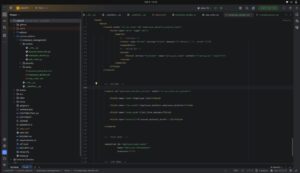
When starting development, understanding the Odoo 19 module structure and how an Odoo project is organized is essential. An Odoo development environment is more than just the Odoo source code. Depending on how the project is set up, it may contain the Odoo source, standard addons, custom addons, a Python virtual environment, configuration files, and other project-specific directories.
For beginners, one of the most common questions is: Where should I keep my custom modules, virtual environment, and configuration files?
Odoo does not enforce one single project structure. These components can be arranged in different ways, as long as Odoo is correctly configured to locate the required addon directories and configuration files.
In this guide, we will explore the Odoo 19 project structure, different ways to organize an Odoo development environment, how addons_path works, the main components of an Odoo module, and the purpose of __init__.py and __manifest__.py.
1. Understanding the Odoo 19 Module Structure & Project Layout
A typical Odoo 19 development environment can contain several important directories.
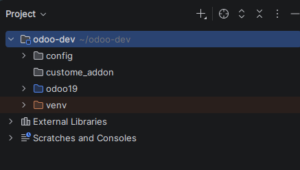
odoo-dev/
├── config/
├── custom_addon/
├── odoo19/
└── venv/
Here:
- odoo19/ – Odoo source code.
- custom_addon/ – custom Odoo modules.
- venv/ – Python virtual environment.
- config/ – configuration files.
This is the structure used in our development environment. The important thing to understand is that these directories do not have to be located inside the Odoo source directory.
2. Understanding the Odoo 19 Source Directory
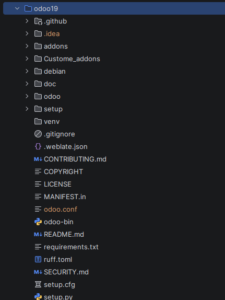
In Odoo 19 Module Structure the Odoo source directory contains the actual Odoo framework. In a source installation, it commonly contains the standard addons, the Odoo Python package, setup files, requirements, and the odoo-bin entry point.
odoo19/
├── addons/
├── odoo/
├── setup/
├── debian/
├── doc/
├── requirements.txt
├── odoo-bin
└── …
The `odoo-bin` file is used to start the Odoo server when running Odoo from source. The `addons` directory inside the Odoo source contains standard Odoo modules.
3. Where Can Custom Addons Be Placed?
Custom modules can be placed in a separate directory rather than directly inside Odoo’s standard `addons` directory.
odoo-dev/
├── odoo19/
│ └── addons/
│
└── custom_addon/
└── employee/
The directory name itself is not important. It can be called `custom_addons`, `custom_addon`, `custom_modules`, `extra_addons`, or another meaningful name. What matters is that the directory containing the custom modules is included in the Odoo `addons_path`.
4. Does Everything Have to Be Inside the Odoo Folder?
No. This is one of the most important things to understand when setting up Odoo.
odoo-dev/
├── config/
├── custom_addon/
├── odoo19/
└── venv/
The Odoo source is in ‘odoo19‘, while the custom addons, virtual environment, and configuration are maintained separately. Another developer may prefer to keep everything under one Odoo project directory. Both approaches can work.
5. Different Ways to Arrange an Odoo Development Environment
Structure A — Separate Project Components
odoo-dev/
├── config/
├── custom_addon/
├── odoo19/
└── venv/
This provides a clear separation between the Odoo source, custom code, configuration, and Python environment.
Advantages:
- Easy to understand.
- Clean project structure.
- Custom modules are separated from Odoo source.
- Configuration is separated.
- Virtual environment is isolated.
Structure B — Everything Inside One Odoo Project Directory
odoo19/
├── addons/
├── custom_addons/
├── venv/
├── odoo.conf
├── odoo-bin
└── …
6. Where Should the Virtual Environment Be?
The Python virtual environment can be placed inside or outside the Odoo source directory. It is used to isolate the Python packages required by Odoo.
odoo-dev/
├── odoo19/
├── custom_addon/
├── config/
└── venv/
On Linux, a typical virtual environment contains bin/, include/, lib/, and pyvenv.cfg. The exact location is a project organization choice.
7. Where Should the Odoo Configuration File Be?
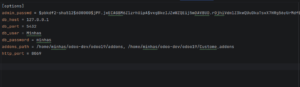
The Odoo configuration file is commonly named odoo.conf. It contains server configuration such as database connection, addon paths, HTTP port, logging configuration, and other Odoo options.
odoo-dev/
├── config/
│ └── odoo.conf
├── custom_addon/
├── odoo19/
└── venv/
The configuration can also be kept inside the Odoo project. Keeping configuration in a separate ‘config’ directory can make larger projects easier to organize.
8. Configuring addons_path
The most important setting for loading custom modules is addons_path. It tells Odoo where it should search for modules.
addons_path = /home/user/odoo-dev/odoo19/addons,/home/user/odoo-dev/custom_addon
Here, Odoo searches two locations:
- The standard Odoo addons directory.
- The custom addons directory.
9. How to Add a Custom Addon Path
Suppose your project looks like this:
odoo-dev/
├── odoo19/
│ └── addons/
│
└── custom_addon/
└── employee/
The configuration should point to the addon directory:
addons_path = /path/to/odoo19/addons,/path/to/custom_addon
The important concept is: add the parent directory that contains your custom modules, not the individual module directory.
custom_addon/
├── employee/
├── sale_customization/
├── property_booking/
└── custom_reports/
Odoo can discover all of these modules through the single `custom_addon` path.
10. Using Multiple Addon Paths
Odoo can search multiple addon directories.
addons_path = /path/to/odoo/addons,/path/to/custom_addons,/path/to/third_party_addons
This can be useful for separating:
- Standard Odoo addons.
- Company custom addons.
- Third-party addons.
odoo-dev/
├── odoo19/
│ └── addons/
├── custom_addons/
└── third_party_addons/
11. What Is an Odoo Module?
An Odoo module is a collection of files that adds or extends functionality in Odoo. A module can contain Python code, XML views, CSV files, security rules, data files, reports, JavaScript, CSS, images, and website assets.
12. Basic Odoo 19 Module Structure
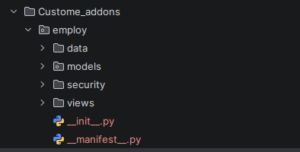
13. Common Components of an Odoo Module
models/
The `models` directory contains Python files that define or extend Odoo models. These files can contain models, fields, business logic, computed fields, methods, constraints, and model inheritance.
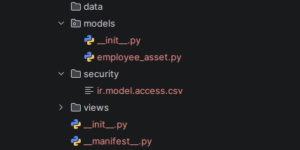
Figure 6. Python model files inside the models directory of an Odoo custom module.
views/
The `views` directory contains XML files that define the Odoo user interface, including list, form, kanban, search, calendar views, actions, and menus.
views/
├── employee_views.xml
└── sale_order.xml
security/
Security files define who can access models and records. A common file is `ir.model.access.csv`, which can control read, create, write, and delete permissions.
security/
└── ir.model.access.csv
data/
The `data` directory can contain predefined data and configuration records such as sequences, email templates, scheduled actions, and other configuration records.
data/
└── employee_sequence.xml
14. Understanding __init__.py
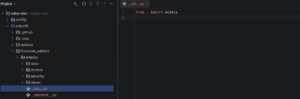
The `__init__.py` file is used to initialize Python packages and import the Python components of the module.
employee/
├── __init__.py
└── models/
├── __init__.py
├── employee.py
└── sale_order.py
The root ‘__init__.py’ imports the ‘models’ package:
from . import models
15. The models/__init__.py File
The ‘models’ directory has its own ‘__init__.py’ file. For example:
from . import employee
from . import sale_order
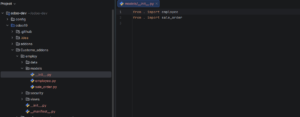
The import chain can therefore be understood as:
employee/__init__.py
↓
models
↓
models/__init__.py
↓
employee.py
sale_order.py
16. Understanding __manifest__.py
The second essential file in an Odoo module is ‘__manifest__.py’. The manifest provides information about the module and tells Odoo which files need to be loaded.
{
“name”: “Employee Management”,
“summary”: “Manage employee records and contact details”,
“version”: “19.0.1.0.0”,
“category”: “Human Resources”,
“license”: “LGPL-3”,
“depends”: [
“base”,
“crm”,
“sale”,
“account”,
],
“data”: [
“security/ir.model.access.csv”,
“data/employee_sequence.xml”,
“views/sale_order.xml”,
“views/employee_views.xml”,
],
“installable”: True,
“application”: True,
}
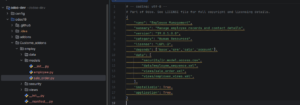
17. Important Parameters in __manifest__.py
name
“name”: “Employee Management”,
Defines the display name of the module.
summary
“summary”: “Manage employee records and contact details”,
Provides a short description of the module.
version
“version”: “19.0.1.0.0”,
Identifies the module version. For Odoo 19 modules, the version commonly begins with 19.0.
category
“category”: “Human Resources”,
Specifies the category under which the module belongs.
license
“license”: “LGPL-3”,
Specifies the license under which the module is distributed.
depends
“depends”: [
“base”,
“crm”,
“sale”,
“account”,
],
Defines the modules that must be available before the custom module can be loaded. If a custom module extends functionality from another Odoo module, that dependency should be declared here.
data
“data”: [
“security/ir.model.access.csv”,
“data/employee_sequence.xml”,
“views/sale_order.xml”,
“views/employee_views.xml”,
],
Tells Odoo which XML and CSV files should be loaded. The order can be important when one file depends on records created by another file.
installable
“installable”: True,
Determines whether the module can be installed.
application
“application”: True,
Indicates that the module is treated as an application. Not every custom module needs to be a standalone application; some are extensions of existing Odoo applications.
18. Putting the Module Components Together
employee/
│
├── data/
│ └── employee_sequence.xml
│
├── models/
│ ├── __init__.py
│ ├── employee.py
│ └── sale_order.py
│
├── security/
│ └── ir.model.access.csv
│
├── views/
│ ├── employee_views.xml
│ └── sale_order.xml
│
├── __init__.py
└── __manifest__.py
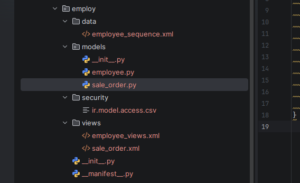
19. How the Main Files Work Together
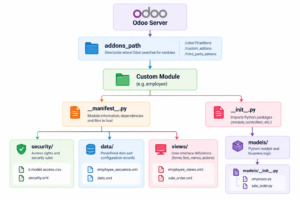
The manifest describes the module and tells Odoo which files need to be loaded. The `__init__.py` files make the Python components available. The models contain business logic, views define the user interface, security controls access, and data contains predefined or configuration data.
20. Recommended Odoo 19 Development Structure
odoo-dev/
│
├── config/
│ └── odoo.conf
│
├── custom_addons/
│ ├── employee/
│ ├── custom_sales/
│ └── custom_reports/
│
├── odoo19/
│ ├── addons/
│ ├── odoo/
│ ├── odoo-bin
│ └── requirements.txt
│
└── venv/
[options]
addons_path = /path/to/odoo19/addons,/path/to/custom_addons
This arrangement provides a clear separation between Odoo source code, custom business modules, the Python environment, and configuration. For a development environment, this is a practical and easy-to-maintain approach.
21. Common Mistakes to Avoid
Adding the wrong addon path
If your module is inside `custom_addons/employee/`, the configuration should normally point to `custom_addons/`, rather than directly to the `employee` module.
Forgetting __init__.py
Python files inside the module need to be imported through the appropriate initialization files.
Forgetting files in the manifest
Creating an XML or CSV file does not automatically mean Odoo will load it. The file generally needs to be included in the appropriate manifest section.
Forgetting dependencies
If your module uses functionality from another Odoo module, that dependency should be declared in `depends`.
Modifying Odoo core unnecessarily
Keep business-specific functionality in custom modules instead of modifying standard Odoo source files whenever possible.
Conclusion
Understanding the Odoo 19 project and module structure is an important first step before starting custom development.
The Odoo source code, custom addons, virtual environment, and configuration file do not have to be stored in one specific location. Developers can organize them according to the needs of their project.
The most important connection is the `addons_path` in the Odoo configuration file. It tells Odoo where to search for standard, custom, and third-party modules.
Inside a custom module, different components have different responsibilities:
- ‘models/’ — Python models and business logic
- ‘views/’ — User interface definitions
- ‘security/’ — Access rights and security rules
- ‘data/’ — Predefined and configuration data
- ‘__init__.py’ — Imports Python components
- ‘__manifest__.py’ — Defines module metadata, dependencies, and files to load
Once this structure is understood, the next step is to create a custom module and see how these components work together in practice.
Frequently Asked Questions
Does Odoo require custom modules to be inside the Odoo folder?
No. Custom modules can be stored in a separate directory as long as that directory is included in the Odoo `addons_path`.
Can I keep the virtual environment outside the Odoo source folder?
Yes. The Python virtual environment can be placed separately from the Odoo source.
Can I have multiple custom addon directories?
Yes. Multiple addon directories can be specified in `addons_path`, separated by commas.
What is the purpose of __init__.py?
It imports the Python packages and files that need to be loaded as part of the module.
What is the purpose of __manifest__.py?
It describes the Odoo module and defines important information such as its name, version, dependencies, data files, and installation options.
What is the difference between addons_path and a module path?
`addons_path` points to directories containing Odoo modules. Individual module directories are discovered inside those addon paths.
Do all Odoo modules need models, views, security, and data directories?
No. The structure depends on the functionality of the module. A simple module may need only some of these components.



1 Comment