


Introduction
A website can attract many visitors, but traffic alone does not tell you whether the site is performing well. You also need to know which pages people visit, how they reach the website, and whether they stay long enough to take useful actions. Odoo 19 makes this easier by bringing website analytics into the Website application.
With the analytics tools available in Odoo, businesses can monitor website activity and use the results to make better decisions about content, marketing, and eCommerce performance.
Where to Find Website Analytics
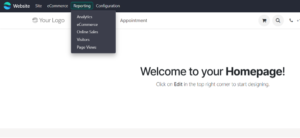
Website analytics can be accessed from the Website application. Open the Website module and use Reporting → Analytics. The Reporting menu also provides other website reports, such as eCommerce, Online Sales, Visitors, and Page Views.
Why Website Analytics Is Useful
Analytics turns website activity into information that can be used for improvement. Instead of relying only on assumptions, you can review actual visitor behaviour and identify areas that need attention.
- Understand how many people are visiting the website.
- See how many pages visitors view during their sessions.
- Identify traffic sources and understand how visitors reach the site.
- Check engagement indicators such as bounce rate and visit duration.
- Use the collected information to improve website content and online sales.
Analytics Options in Odoo 19
Odoo 19 provides two main choices for website tracking: Plausible Analytics and Google Analytics through the Google Tag Manager/Google Analytics setting. Both can be enabled from the Website settings.
Plausible Analytics
Plausible is a lightweight analytics option designed with a strong focus on simplicity and privacy. Once it is connected to the website, Odoo can display the analytics report directly from the Website application.
Google Analytics
Google Analytics is useful when a business needs more detailed tracking and reporting. Odoo provides a field for the Google Analytics or Google Tag Manager identifier, allowing the website to send tracking information to the selected Google service.
Enabling Analytics in Website Settings
The analytics options are located in the Tracking & SEO section of Website settings. The following example shows Plausible Analytics enabled and connected to a website.
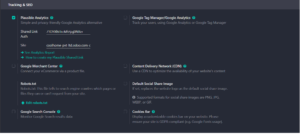
To configure Plausible, enable the Plausible Analytics option and provide the required shared-link authentication details for the website. The available link to the analytics report can then be used to open the report from Odoo.
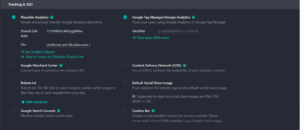
If Google Analytics or Google Tag Manager is required instead, enable the corresponding option and enter the identifier supplied by Google.
Viewing the Analytics Report
After the tracking configuration is saved and website activity is collected, open Website → Reporting → Analytics to review the data. The report provides a quick view of visitor activity and key engagement indicators.
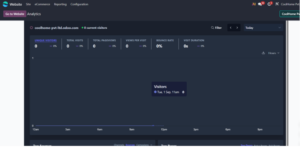
Depending on the selected period and the amount of website traffic, the dashboard can show metrics such as unique visitors, total visits, page views, views per visit, bounce rate, and visit duration. Traffic sources and popular pages can also help identify where visitors are coming from and which parts of the website receive attention.
How to Use the Data to Improve Your Website
Collecting analytics is only the first step. The real value comes from using the information to improve the website.
- If a page receives many visits but few useful actions, review its content and calls to action.
- If visitors leave quickly, check the page layout, loading experience, and relevance of the content.
- If one traffic source performs better than others, consider focusing more marketing effort on that channel.
- Use popular pages to understand what your audience finds useful and create more related content.
- Review the data regularly instead of making decisions from a single day’s results.
A Simple Workflow
A practical approach is to configure one analytics tool, allow enough time for visitor data to accumulate, and then review the same key metrics regularly. This creates a simple cycle:
- Configure tracking in Website → Configuration → Settings.
- Choose Plausible Analytics or Google Analytics/Tag Manager.
- Save the configuration and allow website activity to be recorded.
- Open Website → Reporting → Analytics.
- Review visitor, page-view, traffic-source, and engagement information.
- Make website or marketing changes based on the findings.
- Check the metrics again to see whether the changes improved performance.
Conclusion
Odoo 19 makes website analytics easier to access by connecting tracking tools with the Website application. Plausible offers a simple and privacy-focused approach, while Google Analytics provides a broader set of tracking and reporting capabilities. Once analytics is configured, businesses can use the information in Odoo to understand visitor behaviour, improve their website, and make more informed eCommerce decisions.




4 Comments